
Field guidesResume builder
Build your resume, and know where it went
Choose from five templates or import an existing PDF or Word file, and get feedback on what's missing, checked on your own computer. Each saved version lists every application it was sent with.
Build
Five templates, edited live
Start from a template or import an existing resume as a PDF or Word file. The preview updates as you type, and you can change the fonts, spacing, colour and section order whichever template you pick.
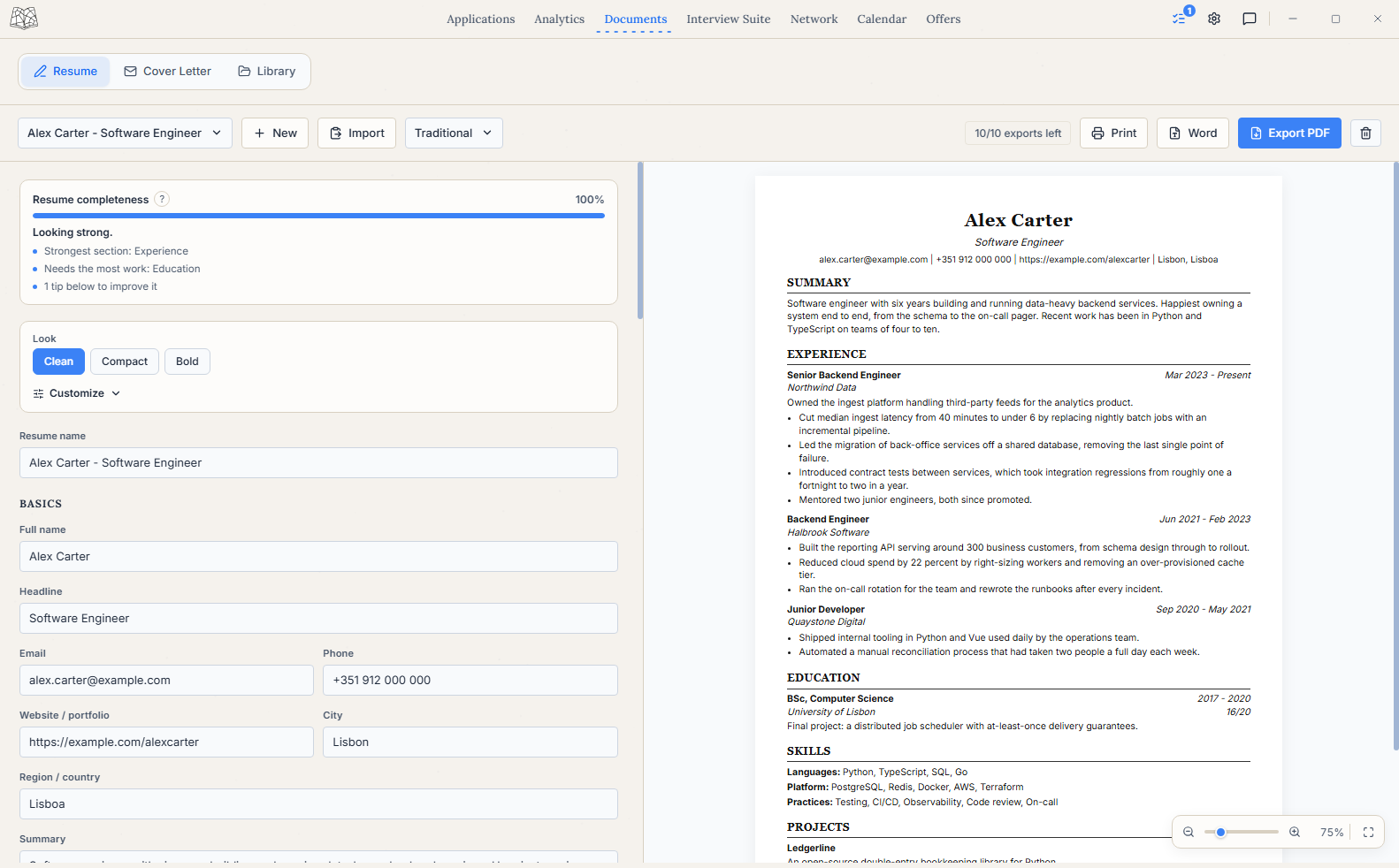 Template pickerThe preview, live
Feedback
What's missing, checked on your computer
A completeness meter and plain-language notes point out weak bullet openers and gaps before you send it. The check runs on your own computer, and nothing is uploaded.
Linking
Which version went where
It's easy to end a search with three or four versions of your resume and no idea which one went to which employer. Seisin tags each saved resume and lists every application it was used on.
backend-v2.pdf Used on 4 applications
- Nimbus Data
- Senior Backend Engineer, interviewing
- Corvane Digital
- Platform Engineer, applied
- Ravenscar Labs
- Site Reliability Engineer, replied
- Silverlake Digital
- Backend Engineer, applied
In context
Each resume stays with the applications it went to
Because each resume is linked to the applications it went out with, you can see which version led to interviews and which led to offers.